
ai_shop_assistant
A shopping chat where the AI searches Shopify's live catalog over MCP instead of making products up.
Project · MCP server and RAG in Ruby on Rails
An MCP server in Ruby on Rails that lets Claude read a store's products, orders and inventory, place orders with approval, and search by meaning.
An AI assistant can only talk. It cannot check your database, place an order or know what is really in stock. Left alone, it guesses, and a guess that sounds right is worse than no answer.
MCP (Model Context Protocol) fixes that by giving the assistant a toolbox. Each tool is one clearly labeled capability, and the assistant reads the labels and decides on its own when to use one.
A Rails app that is an MCP server for a small store. Counted from the code:
| Piece | Count | Examples |
|---|---|---|
| Tools | 7 | get_product_tool, create_order_tool, semantic_search_products_tool |
| Resources | 2 | shop://products/catalog, shop://products/low-stock |
| Prompts | 1 | inventory_check |
create_order_tool is the only write, annotated destructive_hint: true, so Claude groups it apart and asks the user before running it.voyage-3.5-lite, 512 dimensions), stored in a pgvector column and searched by cosine similarity. A search for “something warm for winter” surfaced the scarf and the beanie, though neither word is in their descriptions (a hand check, not a benchmark).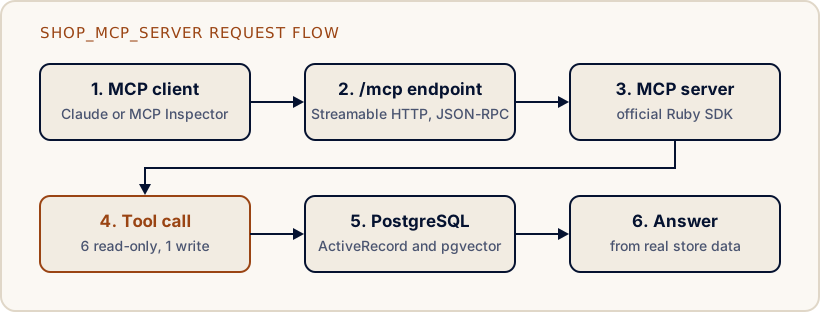
A normal chat reply is Question → Answer. With MCP it becomes Question → pick a tool → real data → Answer:
tools/list and reads every tool’s description.check_inventory_tool.tools/call with arguments.create_order_tool.Claude reported an authentication problem. It was not one. I first built the server on the community fast-mcp gem. Claude’s connector setup kept failing with an auth error. The real cause was the transport: fast-mcp only speaks the older SSE transport, Claude probes with Streamable HTTP, and the probe hit a GET-only route and got a 405. I rewrote every tool on the official mcp Ruby SDK, which supports Streamable HTTP natively.
The docs were wrong about argument keys. The SDK’s docs show prompt arguments with string keys. At runtime they arrive as symbols. I found it with a debug log line, and a spec now guards against someone “fixing” it back.
The lesson I took from both: docs and tutorials are not the source of truth, running code is.
A working learning project, not production software. Sessions are in memory (single process), there is no authentication, and semantic search has been checked by hand but has no specs yet. The full list of limitations is in the README.
Need something like this in your own product? See AI engineering and integration.
A shopping chat where the AI searches Shopify's live catalog over MCP instead of making products up.
An AI agent that scores how discoverable a Shopify product is to AI shopping assistants (GEO and AEO).
A Rails support agent, in progress, that looks up real order data with tools and is designed to ask a human before any risky action.